J.O.T Revit AI Plugin
Automate Revit workflows. No coding required.
J.O.T Revit AI Plugin is an intelligent assistant built directly into Autodesk Revit, designed to automate repetitive tasks, eliminate manual scripting, and dramatically speed up project delivery.
Start your 14-day free trial and let AI handle the repetitive work for you.
Planned release: January 2026
Why J.O.T Revit AI?
Because your time should be spent designing — not clicking.
Hours Wasted
Exporting data, tagging elements, generating schedules, placing families...
Repetitive Tasks
The same clicks, the same steps, project after project.
Instant Solution
J.O.T Revit AI turns these hours into seconds.
Revit projects are full of daily micro-tasks that are essential, but they eat hours of productive time. Instead of writing Python or Dynamo scripts, simply describe what you want — and the plugin generates, runs, and saves the automation instantly.
Capabilities
Key Features
Everything you need to supercharge your Revit workflow

NoCoding Automation
Generate custom Revit automations using natural language instead of Dynamo graphs or API scripts.
Smart Workflows
Ask AI to turn logic into interactive tools. Create scripts with built-in forms and inputs, allowing users to define variables, names, parameters on the fly before running.
Batch Element Creation
Place columns, walls, pipes, fittings, panels, or other families in bulk using custom logic, spacing, or grid intersections.
Reusable Scripts
Save generated code for future projects. Load it back later with one click.
Human-to-AI Layer
A natural-language interface that turns engineering intent into real, executable automations.

Smart Model Analysis
Use “Analyze Errors” to understand why a script didn’t work. AI explains the problem and suggests fixes.
Simple Process
How It Works
A streamlined workflow for anyone, at any level
STEP 1
Write a request in plain English
STEP 2
Click “Ask AI” to generate the code
STEP 3
Run the code and get results
Refine your prompt and try again — the workflow is iterative and flexible.
Use Cases
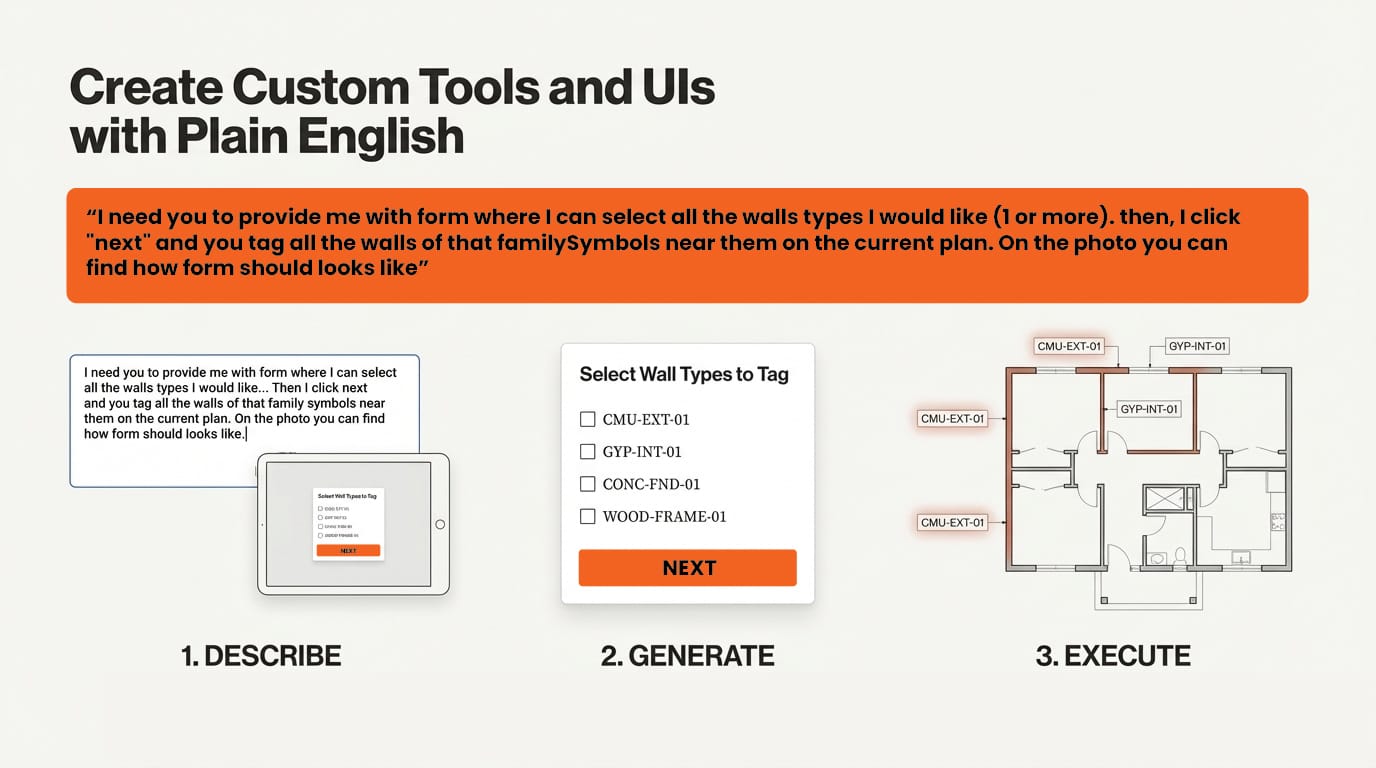
Description and Task Goal: The task is to create a form that allows the user to select one or more wall types and then automatically tag all walls of the selected types on the current floor plan
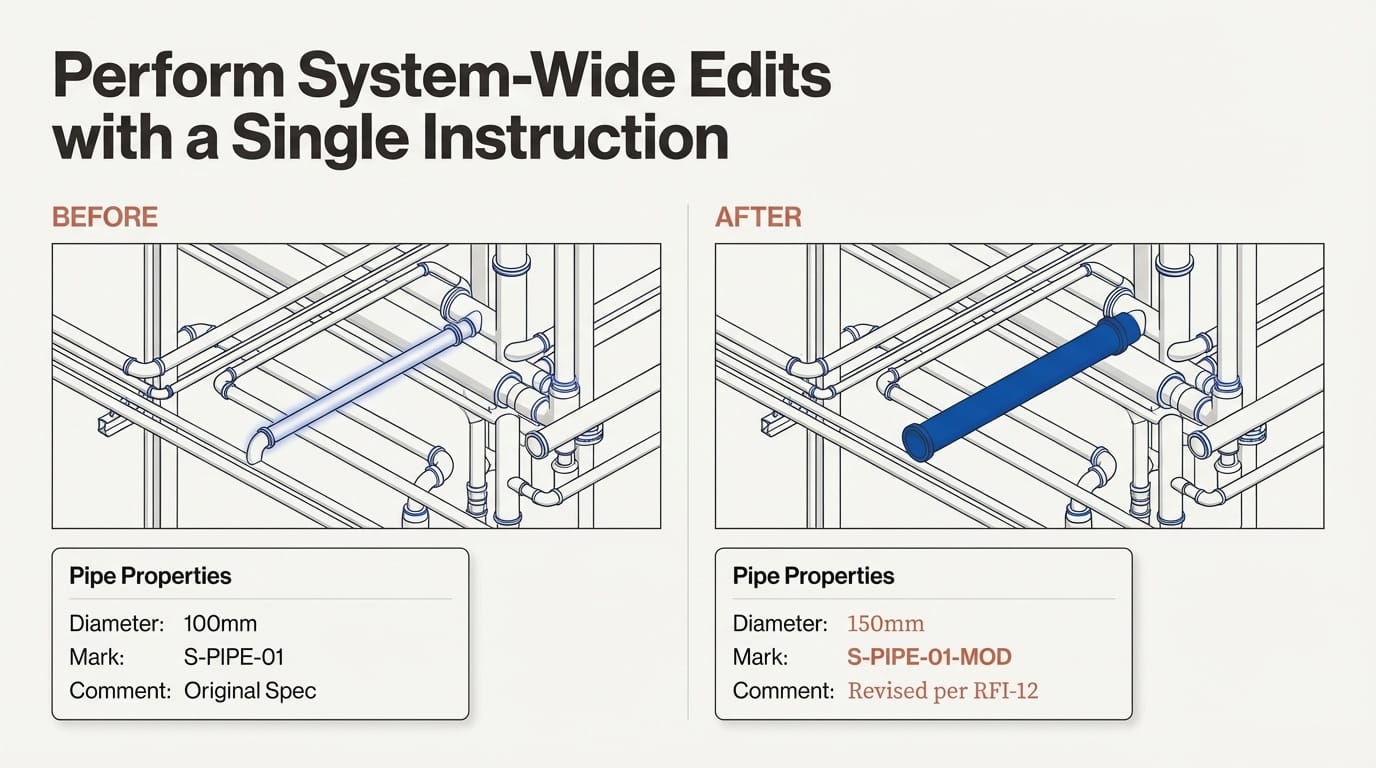
Description and Task Goal: The task is to change the diameters of the pipes and connectors based on the system type and name and to update the mark and comment values to the required ones
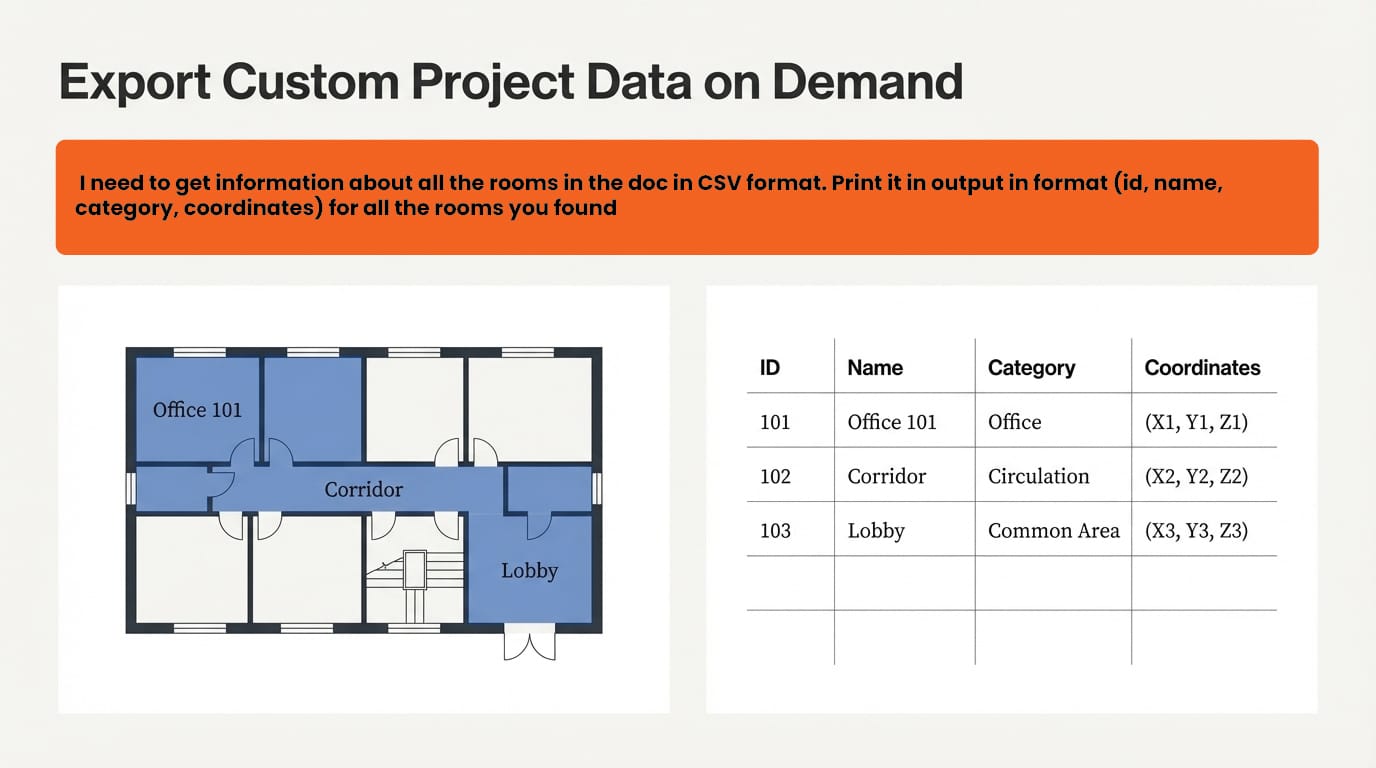
Description and Task Goal: The task is to export all necessary information about the rooms in the document into CSV format, specifying the output fields as ID, name, category, and coordinates
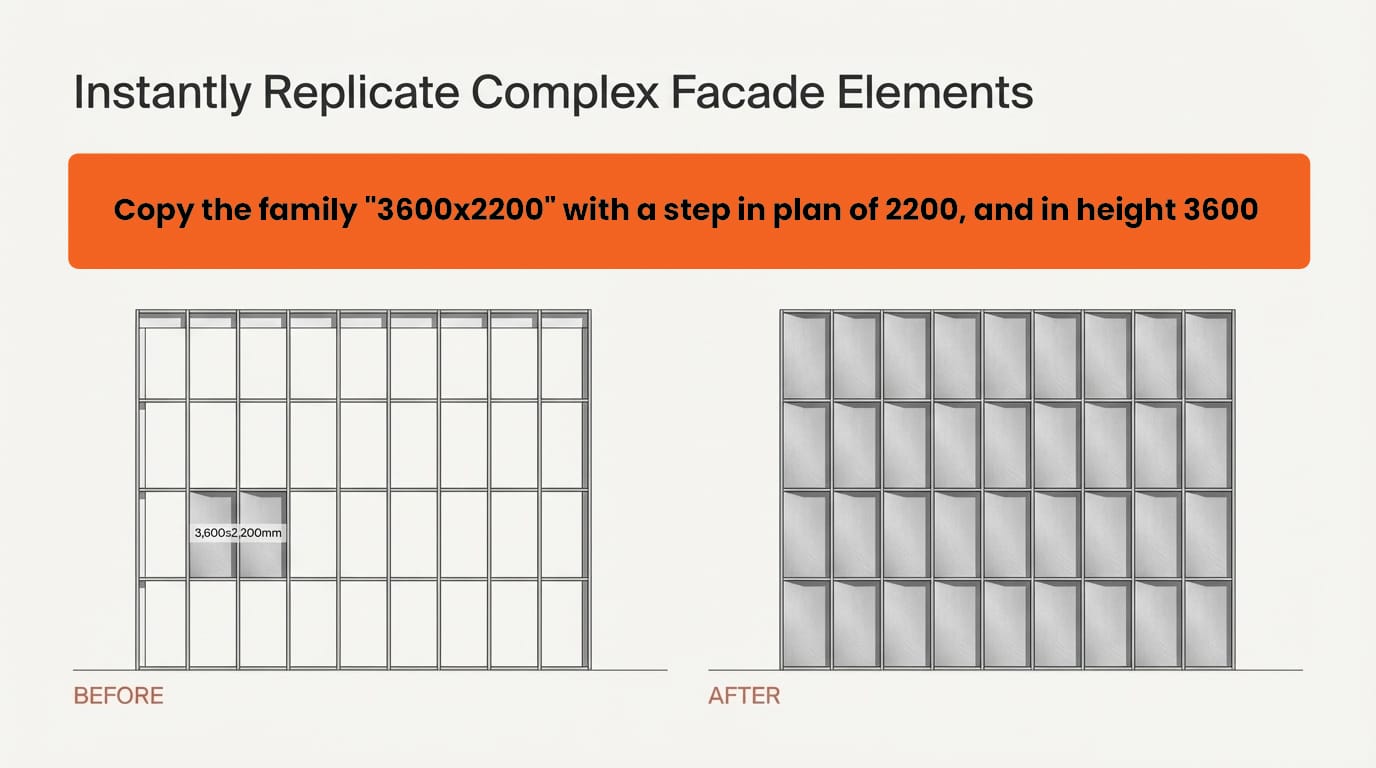
Description and Task Goal: The task is to copy an element of the aluminum family (3,600×2,200) with a given step in the plan view (2,200) and a given step in height (3,600)
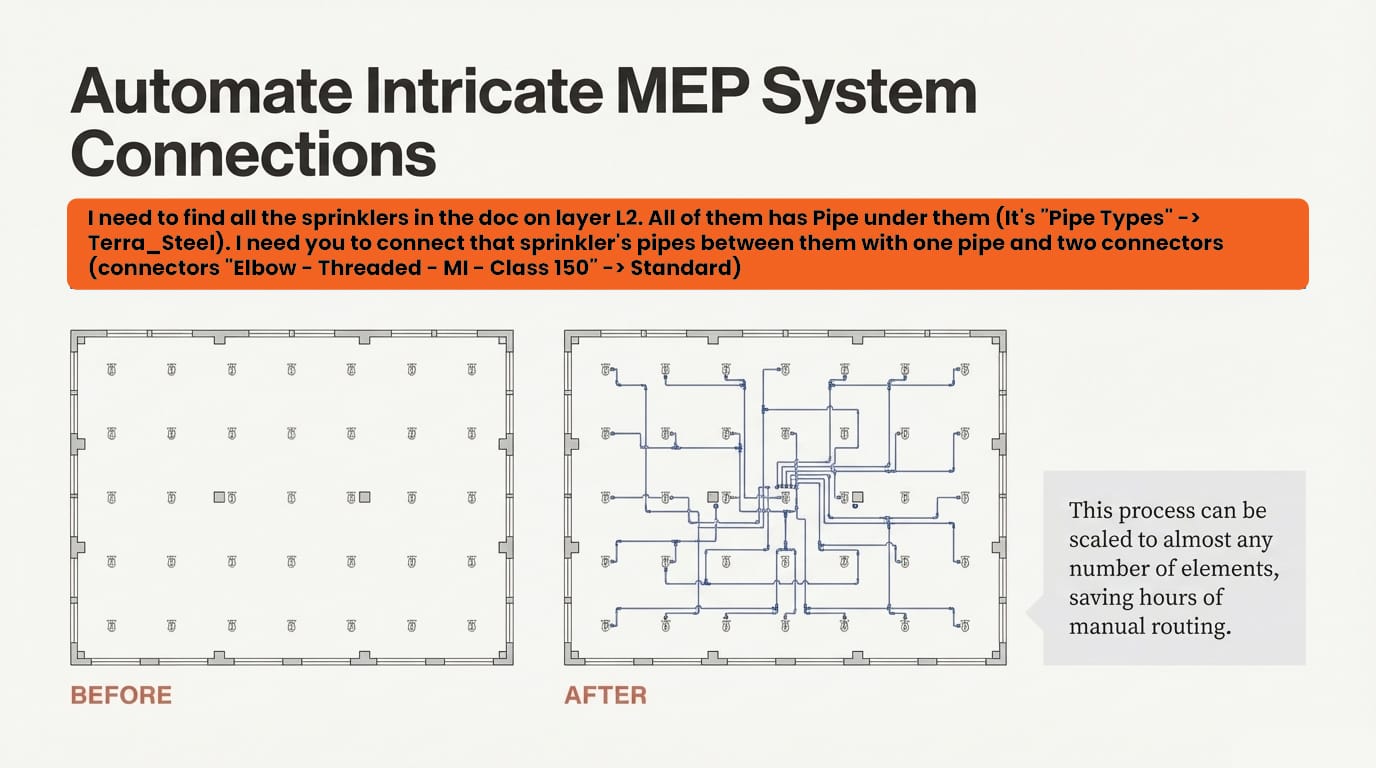
Description and Task Goal: The task is to connect all the sprinklers on layer 2 using the given type of pipes and connectors. This code can be scaled to almost any number of sprinklers
Description and Task Goal: The task is to create a specific element, such as a structural column “M-concrete-rectangular-column 450x 600 mm”, at each intersection of the axes
Need clarity on any feature?
Our experts are here to guide you through the details.
Benefits
Unlock the full potential of AI-powered automation across every stage of your Revit workflow.

Save Hours on Repetitive Work
Speed up routine tasks from hours to minutes — or seconds.
Reduce Human Error
AI-generated scripts follow strict logic and remove inconsistencies.
Improve Project Quality
More time to focus on design, less time lost on manual labor.
No Learning Curve
If you can describe your task, you can automate it.
Scalable for Teams
Save generated code for future projects. Load it back later with one click.
Reusable Automations
Save, share, and reuse scripts across projects.

Who Is It For?
- BIM Managers
- Architects
- MEP Engineers
- Structural Designers
- Revit Power Users
- Teams looking to modernize their workflows
How to Get Started
Create an Account
Sign up at store.jot-s.com — it just takes a minute.
Get the Plugin
Go to the Plugins tab, activate the “J.O.T Revit AI” trial, and download the installer.
Install and Launch
Run the installer, open Revit, and find the J.O.T Revit AI tab.
Sign In and Start
Log in with your account, describe your task, generate and run your first script.
Trial Ended? Let’s Talk
When your free trial ends, contact us in any convenient way to continue using Revit AI.
Need onboarding support?
Our team is ready to assist you in a live one-on-one session.
FAQ
Still have questions?
What does the J.O.T Revit AI Plugin actually do?
It generates and runs scripts based on plain-language prompts, helping automate repetitive Revit tasks.
Do I need any coding or Dynamo experience to use it?
No. All functionality is accessed through natural-language prompts.
Which Revit versions does the plugin support?
The plugin supports recent releases of Autodesk Revit.
Can the plugin work with large or complex models?
Yes, the generated scripts and workflows are designed to handle projects of different sizes and complexity.
Is the generated code editable?
Yes. You can refine, adjust, and save the generated scripts for future use.
How does licensing work?
Users register an account, activate their trial or subscription, and can then use the plugin on supported Revit versions.
Can I reuse scripts across multiple projects or teams?
Yes. Saved scripts can be shared and reused to standardize workflows across teams.
Does the plugin modify models automatically?
Only when you run a generated script. All actions are controlled by the user.
Is the plugin safe for production models?
Yes. All operations follow Revit’s API rules, and users can review generated code before running it.
Can I undo changes created by a script?
Yes. All changes appear in Revit’s standard Undo stack.
Does the plugin require an internet connection?
Yes. Code generation and error analysis require cloud processing.
How do I contact support if something goes wrong?
You can use the contact form on the website to reach support or request assistance from a specialist.
Your Revit. Your Workflow. Supercharged.
J.O.T Revit AI Plugin brings intelligent automation into everyday design workflows — without the complexity of scripting.
If you can describe the task, you can automate it.
Just tell the AI what you want to achieve — it builds the script for you, and with one quick run you get the result directly inside Revit.
No coding, no Dynamo, no friction. Simply write, run, and move on.